
Cinema FV-5
FGAE AppsPhotography
2.8688.00 Reviews
- Version
- 2.2.1
- Installs
- 100.00K
- Age Rating
- Everyone
Screenshots
Our Review of Cinema FV-5
 Analysis by Appyee
I often think of a camera app as something one person sets up and uses alone, but a phone is frequently passed around: one person films a school concert, another records a cooking clip, and someone else wants to capture a family walk. That shared-device reality is where a manual video app can be both useful and a little demanding. Cinema FV-5 gives the person behind the camera more control than a typical point-and-shoot app, but the household gets the best results when the person filming understands what the controls do.
For a simple handoff, I would treat it as a camera with a deliberate operator rather than a universal, foolproof recorder. Before passing the phone to someone else, I’d check the framing, focus, exposure, and audio level, then explain which control they should leave alone. That small routine can prevent a well-meant adjustment from changing the look or sound halfway through a clip.
A shared phone needs a clear camera routine
A practical example is recording a child’s short performance at home. I would open the app before the moment starts, frame the subject, check that the focus is where it needs to be, and listen to the input monitoring if sound matters. Once the recording is underway, the person holding the phone can concentrate on keeping it steady instead of searching through controls. The app’s manual options are most helpful when they are set with a purpose, not when every setting is changed at once.
For a household clip that needs no particular visual style, the phone’s usual camera app may be the easier choice. It is generally the better fit when someone needs to tap record quickly and hand the device to another person without a short lesson. I would choose Cinema FV-5 when I want to make a considered adjustment—such as keeping exposure consistent as the scene changes—or when I plan to check focus and sound rather than accept whatever the automatic camera decides.
Set expectations before handing over the phone
The app is a photography tool for video, not a household account or device-management system. I would not rely on it to separate one family member’s preferences from another’s, or to coordinate who can use the phone. Instead, the useful boundary is a simple one: agree who is filming, what the clip is for, and whether the person borrowing the device should change the manual settings. That is especially helpful when one person has already prepared a particular look for a project.
Manual control also creates a trade-off. It gives a careful user more say over the image, yet it asks that user to notice when the conditions change. A setting that suits a bright window may not suit a dim room, and a focus choice made for a stationary subject may need attention if the subject moves. I would avoid handing the app to someone who expects every control to correct itself without thought; for casual recording, the automatic option can be less stressful.
Age, trust, and who should use it
The app is rated Everyone, but that age label is not the same as saying every user will find its controls straightforward. In my view, it suits adults, older children, or teens who already enjoy filming and can follow a few camera instructions. For younger users, I would have an adult set up the shot and supervise the recording, particularly when the clip includes other people or is being made in a shared space. Good habits—asking before filming and agreeing where a clip will be shared—matter more than the choice of camera app.
For creators in a household, the strongest use case is a small project where repeatable choices matter: a cooking demonstration, a craft tutorial, a short interview, or a sequence of clips that should feel consistent. I would keep a brief note of the settings that worked for a particular room or subject, then check them again when the light or sound source changes. That is a more reliable workflow than assuming a previous setup will suit every new scene.
What it asks of the person filming
People often ask whether manual controls are worth learning if a phone already records video. My answer is: only when you can name the problem you want to solve. If automatic exposure keeps shifting during a shot, manual exposure choices may help you keep the image steadier. If a subject is hard to keep sharp, focus tools can make checking easier. If the audio level is uncertain, monitoring can help you catch a problem while you can still adjust. None of these controls turns a shaky hand, poor framing, or a noisy room into a polished production by itself.
I would also test the whole recording workflow before an important event. Make a short sample, play it back with sound, and check that the result looks and sounds as intended. This is a simple but easily missed step: the live view can seem fine while a focus or audio issue becomes obvious only afterward. A brief test is especially sensible when using an external microphone or relying on a specific frame-rate choice.
The app is from FGAE Apps, costs $2.49, and has a 2.8 average from around 6,700 ratings, with roughly 688 written reviews. It has reached over 100,000 installs. Those figures make me cautious about describing it as an automatic recommendation for everyone: I’d weigh its hands-on approach against the kind of recording you actually do. It is a paid app, so I would want the manual controls to be part of my regular workflow rather than something I open once out of curiosity.
Its age also helps set expectations. It was released on April 10, 2014, and the current version is 2.2.1, with Android 5.0 as the minimum operating system. Those details are worth checking against the phone you plan to use. More importantly, camera behavior can depend on the device, so I would try the controls on that phone before planning a project around a particular option.
When another camera app is the better fit
Compared with a standard phone camera, Cinema FV-5 is appealing when I want to take responsibility for the shot instead of leaving most decisions to automation. Compared with a full editing workflow, though, it is only the recording stage: it does not remove the need to plan, listen, keep the phone stable, or edit afterward. Someone who mainly wants quick clips with minimal setup may be happier with the default camera, while a creator who needs a more elaborate production pipeline may prefer a dedicated camera and separate audio tools.
There is also a useful middle ground: use the app for the parts of a project where manual control matters, and use the phone’s simpler camera for informal moments. I would not force every household video through a more involved setup. The extra attention is justified when consistency, focus, exposure, or sound monitoring has a clear payoff; it is unnecessary friction for a clip that only needs to capture a spontaneous moment.
If several people share the phone, I’d agree on a simple handoff routine: the person who knows the setup prepares the shot, the next person keeps the phone steady and avoids changing controls, and everyone checks the recording afterward. That approach respects the app’s strengths without pretending that a camera interface can solve coordination or consent on its own.
If you're a photography enthusiast or a budding cinematographer, then you’ve probably been on the hunt for an app that can turn your phone into a professional video camera. Well, look no further because Cinema FV-5 is here to revolutionize your mobile videography experience. Let me walk you through my experience of exploring this app, and why it might just be the perfect addition to your toolkit.
First Impressions and Interface
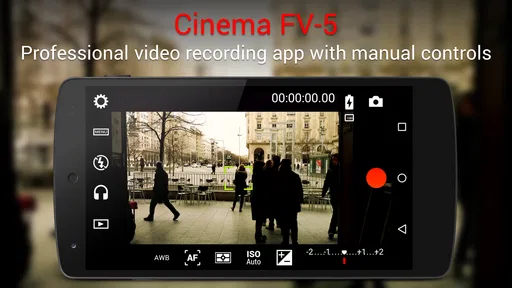
Upon launching Cinema FV-5, the first thing that struck me was its user-friendly interface. It’s like stepping into a world where every control is at your fingertips, literally. The app offers a plethora of manual controls that you usually find on professional cameras. From focus to exposure, you name it, it’s there. The layout is intuitive, making it easy even for beginners to navigate through the different options.
The interface is clean, with a dark theme that’s easy on the eyes. It’s clear that the developers have put a lot of thought into making the user experience smooth and efficient. You won’t find yourself fumbling around trying to find the right settings, which is a huge plus when you’re trying to capture that perfect shot.
Feature-Packed Performance
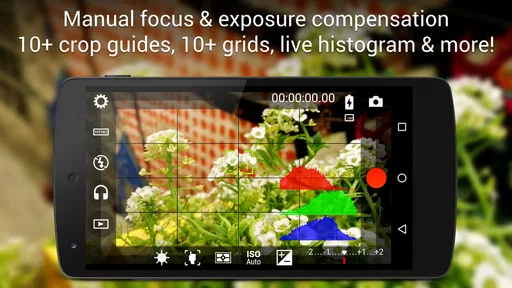
The real magic of Cinema FV-5 lies in its extensive feature set. You can manually adjust parameters like ISO, white balance, exposure compensation, and focus. This level of control allows you to create videos that are tailored to your unique vision. It’s like having a DSLR in your pocket.
One feature I particularly enjoyed is the focus peaking. It highlights the areas of the frame that are in focus, ensuring that your subject is always sharp. This is especially useful in dynamic shooting environments where precision is key.
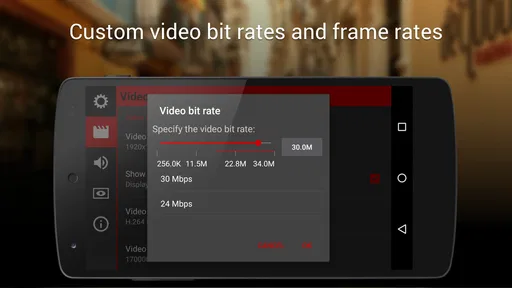
Another highlight is the adjustable frame rates. Whether you’re shooting an action-packed scene or a serene landscape, you can select the appropriate frame rate to match your creative needs. This flexibility is invaluable for creators who are looking to experiment with different styles.
Audio Controls and Extras
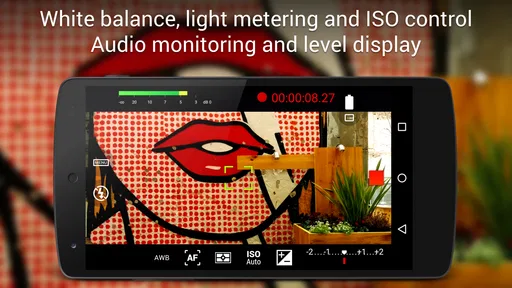
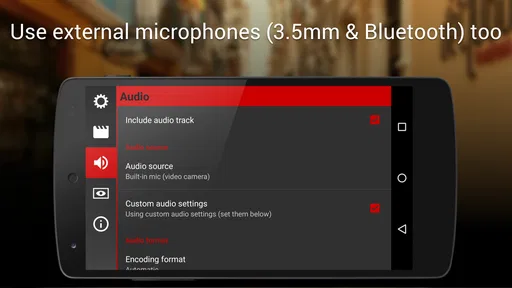
Let’s talk audio. The app doesn’t skimp on audio controls either, offering manual gain control and real-time audio input monitoring. This means you can ensure that your audio levels are just right, avoiding any nasty surprises during post-production.
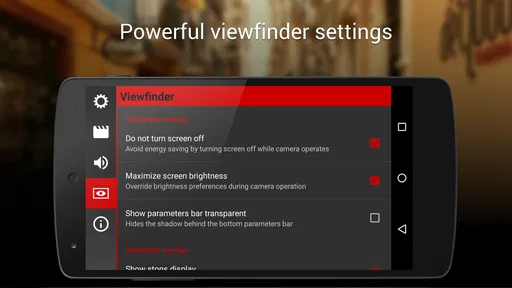
Additionally, the app supports external microphones, which is a game-changer for anyone serious about their video’s sound quality. Coupled with the ability to overlay a histogram, zebra stripes, and even a live RGB waveform, you’re equipped with all the tools you need to make sure your video’s technical aspects are spot on.
Real-World Application
In practice, Cinema FV-5 delivers on its promises. I took it out for a test spin during a weekend trip, capturing everything from bustling cityscapes to tranquil nature scenes. The app handled various lighting conditions with aplomb, and the resulting videos were crisp and vibrant.
The manual controls allowed me to adjust on the fly, ensuring that each shot was exactly how I envisioned it. The focus peaking was a lifesaver in crowded settings, and the customizable frame rates gave my footage a professional touch.
The Verdict: Is It Worth It?
In a world where content creation is king, Cinema FV-5 is an invaluable tool for anyone looking to elevate their videography game. It combines professional-level features with the convenience of a smartphone app, offering a seamless and powerful shooting experience.
Whether you’re a seasoned videographer or just getting started, this app offers something for everyone. Its robust set of features, combined with an easy-to-use interface, makes it a top contender in the mobile videography space.
So, if you’re ready to take your videos to the next level, Cinema FV-5 is definitely worth checking out. It’s like having your very own film studio in your pocket, ready to capture the world in all its cinematic glory.
Verdict
Strengths of Cinema FV-5
- Professional-grade video controls.
- Intuitive interface for easy navigation.
- Supports 4K video recording.
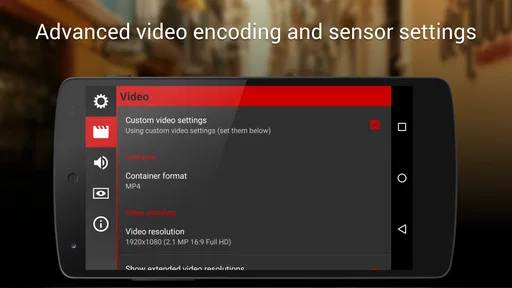
- Customizable frame rates and resolutions.
- Comprehensive color adjustments available.
Limitations of Cinema FV-5
- Lacks built-in video editing tools.
- High battery consumption during use.
- Requires advanced knowledge for full use.
- Occasional app stability issues reported.
- Limited free features; many in-app purchases.
Other Releases by FGAE Apps
View All
Camera FV-5
Photography4.1
Similar Picks in This Category
View All
Google Photos
Google LLC4.4

Gallery
Google LLC4.2

Picsart AI Photo Editor, Video
PicsArt, Inc.3.9

B612 AI Photo&Video Editor
SNOW Corporation4.1

BeautyPlus-Selfie Photo Editor
PIXOCIAL TECHNOLOGY (SINGAPORE) PTE. LTD.4.5

Remini - AI Photo Enhancer
Bending Spoons4.1
Frequently Asked Questions
What is Cinema FV-5, and what are its key features?
Cinema FV-5 is a professional video camera application designed for mobile devices. It offers manual control over exposure, focus, white balance, and audio levels, mimicking a DSLR experience. Key features include multiple video codecs, real-time audio monitoring, and the ability to adjust frame rates, making it ideal for filmmakers and videographers.
Is Cinema FV-5 suitable for beginners in video production?
While Cinema FV-5 offers professional-grade features, it is designed with an intuitive interface that makes it accessible to both beginners and seasoned filmmakers. Beginners may benefit from exploring the app's tutorials and experimenting with different settings to understand its full potential. The app provides a balance of simplicity and complex controls.
Can I adjust audio settings while recording with Cinema FV-5?
Yes, Cinema FV-5 allows real-time audio monitoring and adjustment. You can control audio gain levels manually during recording to ensure optimal sound quality. This feature is particularly useful for capturing high-quality audio in various environments and is a standout for those serious about audio in their video projects.
Does Cinema FV-5 support different video resolutions and frame rates?
Cinema FV-5 supports a wide range of video resolutions and frame rates, catering to various production needs. Users can select from standard resolutions to 4K, depending on their device's capability, and adjust frame rates to match their creative requirements or specific project standards, enhancing the app's versatility.
What devices are compatible with Cinema FV-5?
Cinema FV-5 is available for both Android and iOS devices, but compatibility may vary based on the device's hardware capabilities. It's recommended to check the app's specifications and your device's performance to ensure it supports the resolution and frame rates you intend to use, providing the best user experience.
